Private Photo Vault - password1.0.14
Publisher Description

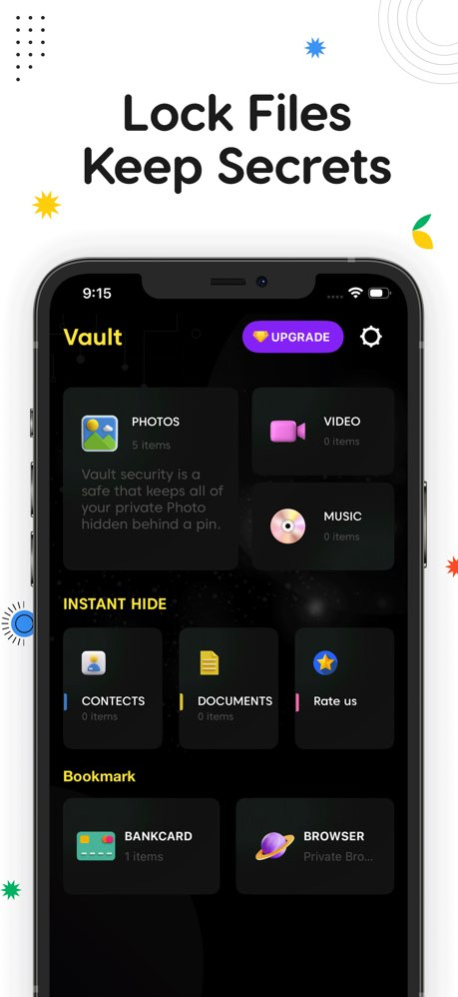


Secure Vault: Hide Photos, Videos & Files
Secure your personal life with military-grade encryption. [App Name] allows you to hide photos, videos, and files behind a secret PIN, Touch ID, or Face ID.
Once imported into the Vault, your private media is completely invisible in the main gallery. You can safely delete photos from your phone’s public album while keeping them permanently secure in your secret vault.
TOP FEATURES:
Hide Photos & Videos Import unlimited images and videos. They disappear from your public gallery and exist only in your secure vault.
Secure File Management Hide not just photos, but any file type. Sort, search, and organize your private data with custom folders.
Private Cloud Backup Never lose your memories. Automatically back up your hidden files to a secure private cloud.
Disguise Mode (Fake Icon) Change the app icon to look like a Calculator or System app so no one knows it exists.
Built-in Player Watch hidden videos and view GIFs directly inside the app without unhiding them.
Smooth Experience Beautiful, easy-to-use interface with no storage limits.
VAULT PRO UNLIMITED SUBSCRIPTION Unlock the ultimate experience with Vault Pro:
No Ads: Enjoy an uninterrupted experience.
Cloud Backup: Secure your data online.
Subscription Details:
- Plans: Weekly, Monthly, or Annual billing options.
- Lifetime Access: A one-time payment option is also available (Non-consumable).
- Payment: Charged to your iTunes Account at confirmation of purchase.
- Auto-Renewal: Subscription automatically renews unless auto-renew is turned off at least 24 hours before the end of the current period.
- Renewal Cost: Account will be charged for renewal within 24 hours prior to the end of the current period.
- Management: You can manage subscriptions and turn off auto-renewal in your Account Settings after purchase.
- Unused Portion: Any unused portion of a free trial period, if offered, will be forfeited when you purchase a subscription.
[Terms of Use] https://skyinfotechdeveloper.com/terms_and_condition_ios.html
[Privacy Policy] https://skyinfotechdeveloper.com/privacy_policy_ios.html
Version History * We’ve fixed some bugs to make the app more stable
* Improved overall performance
* Enjoy a faster and smoother vault experience 1.0.14 Apr 18 • Bug fixes and performance improvements
• Improved app stability
• Minor UI enhancements for a smoother experience 1.0.13 Mar 23 • We’ve squashed some bugs
• Improved app speed and performance
• Enjoy a smoother and more reliable experience! 1.0.12 Mar 22 • Fixed minor bugs to improve app stability
• Enhanced performance for faster and smoother usage
• Improved overall user experience 1.0.11 Mar 20 - Enhanced graphics & user interface.
- Bug fixes and performance improvements. 1.0.10 Mar 11 Enhanced graphics & user interface.
Bug fixes and performance improvements. 1.0.9 12/17/2025 - Flip to Lock: Just flip your phone to instantly lock the vault
- Shake to Lock: Shake your device to secure your data in a second
- 4 New App Lock Styles: Fresh, modern lock screen designs for a personalized look
Your privacy just got stronger and smoother. 1.0.8 11/19/2025 - Card Vault: A new section to safely manage all your bank cards in one place
- Inbuilt Secure Browser: Browse privately within the app for added security
- Performance & Bug Fixes: Improved app stability and fixed minor bugs 1.0.7 09/23/2025 - Localization Support: Vault is now available in multiple languages
- Enhanced Passcode Options: Now choose between 4-digit or 6-digit passcodes for better security
- Performance & Bug Fixes: Improved app stability and fixed minor bugs 1.0.6 08/21/2025 • Bug Fixes & Performance Enhancements : Enjoy a smoother and more reliable app experience. 1.0.5 03/12/2025 • Bug Fixes & Performance Enhancements : Enjoy a smoother and more reliable app experience. 1.0.4 03/05/2025 • Bug Fixes & Performance Enhancements : Enjoy a smoother and more reliable app experience. 1.0.3 12/14/2024 Check out our latest enhancements:
- iCloud Backup & Restore: Keep your data safe in the iCloud and access it anywhere, anytime.
- UI Improvements & Bug Fixes: Enjoy a smoother, more intuitive experience. 1.0.2 12/01/2024 Check out our latest enhancements:
- Contact Lock & Direct Communication: Secure your contacts and easily message or call without saving numbers!
- Document Lock: Keep your important documents safe with our new lock feature.
- UI Improvements & Bug Fixes: Enjoy a smoother, more intuitive experience. 1.0.1 08/08/2024 1.0 07/21/2024
About Private Photo Vault - password
The company that develops Private Photo Vault - password is Laxay Gajera. The latest version released by its developer is 1.0.14.
To install Private Photo Vault - password on your iOS device, just click the green Continue To App button above to start the installation process. The app is listed on our website since 2026-10-14 and was downloaded 0 times. We have already checked if the download link is safe, however for your own protection we recommend that you scan the downloaded app with your antivirus. Your antivirus may detect the Private Photo Vault - password as malware if the download link is broken.
How to install Private Photo Vault - password on your iOS device:
- Click on the Continue To App button on our website. This will redirect you to the App Store.
- Once the Private Photo Vault - password is shown in the iTunes listing of your iOS device, you can start its download and installation. Tap on the GET button to the right of the app to start downloading it.
- If you are not logged-in the iOS appstore app, you'll be prompted for your your Apple ID and/or password.
- After Private Photo Vault - password is downloaded, you'll see an INSTALL button to the right. Tap on it to start the actual installation of the iOS app.
- Once installation is finished you can tap on the OPEN button to start it. Its icon will also be added to your device home screen.
Program Details
System requirements
Download information
Pricing
Version History
version 1.0.14
posted on 2026-10-14
Version History * We’ve fixed some bugs to make the app more stable
* Improved overall performance
* Enjoy a faster and smoother vault experience 1.0.14 Apr 18 • Bug fixes and performance improvements
• Improved app stability
• Minor UI enhancements for a smoother experience 1.0.13 Mar 23 • We’ve squashed some bugs
• Improved app speed and performance
• Enjoy a smoother and more reliable experience! 1.0.12 Mar 22 • Fixed minor bugs to improve app stability
• Enhanced performance for faster and smoother usage
• Improved overall user experience 1.0.11 Mar 20 - Enhanced graphics & user interface.
- Bug fixes and performance improvements. 1.0.10 Mar 11 Enhanced graphics & user interface.
Bug fixes and performance improvements. 1.0.9 12/17/2025 - Flip to Lock: Just flip your phone to instantly lock the vault
- Shake to Lock: Shake your device to secure your data in a second
- 4 New App Lock Styles: Fresh, modern lock screen designs for a personalized look
Your privacy just got stronger and smoother. 1.0.8 11/19/2025 - Card Vault: A new section to safely manage all your bank cards in one place
- Inbuilt Secure Browser: Browse privately within the app for added security
- Performance & Bug Fixes: Improved app stability and fixed minor bugs 1.0.7 09/23/2025 - Localization Support: Vault is now available in multiple languages
- Enhanced Passcode Options: Now choose between 4-digit or 6-digit passcodes for better security
- Performance & Bug Fixes: Improved app stability and fixed minor bugs 1.0.6 08/21/2025 • Bug Fixes & Performance Enhancements : Enjoy a smoother and more reliable app experience. 1.0.5 03/12/2025 • Bug Fixes & Performance Enhancements : Enjoy a smoother and more reliable app experience. 1.0.4 03/05/2025 • Bug Fixes & Performance Enhancements : Enjoy a smoother and more reliable app experience. 1.0.3 12/14/2024 Check out our latest enhancements:
- iCloud Backup & Restore: Keep your data safe in the iCloud and access it anywhere, anytime.
- UI Improvements & Bug Fixes: Enjoy a smoother, more intuitive experience. 1.0.2 12/01/2024 Check out our latest enhancements:
- Contact Lock & Direct Communication: Secure your contacts and easily message or call without saving numbers!
- Document Lock: Keep your important documents safe with our new lock feature.
- UI Improvements & Bug Fixes: Enjoy a smoother, more intuitive experience. 1.0.1 08/08/2024 1.0 07/21/2024
version 1.0.9
posted on 2025-12-17
Enhanced graphics & user interface.
Bug fixes and performance improvements.
version 1.0.11
posted on 1970-01-01
• Fixed minor bugs to improve app stability
• Enhanced performance for faster and smoother usage
• Improved overall user experience
